


Anyone who has edited a block-heavy page in EmDash knows the frustration: every block form sat fully expanded, stacked one below the next. Moving a single block meant scrolling past dozens of open fields first. If a colleague opened the same post at the same time, their only options were "Open read-only" or "Take over." And sending basic system emails—like user invitations or magic login links—required installing a separate plugin.
EmDash 1.5 fixes all three problems at once. Multiple people can now edit the same entry simultaneously in real time, the redesigned editor collapses blocks cleanly by default, and the CMS sends email natively over SMTP. On top of that, 1.5 adds first-class AVIF image output and a built-in staging mode for new sites—automatically adding noindex rules so unfinished client sites and placeholder content stay out of Google until someone explicitly clicks Go live.
Since EmDash 1.4, around 40 contributors have landed 312 commits. Many of them tackle concrete everyday annoyances: admin tables overflowed narrow phone screens, redirects containing umlauts or accented characters failed to match, password-protected WordPress posts became publicly readable after an import, and Cloudflare's new D1 query size limit could break database backups on larger sites.
Here is an overview of the major additions in EmDash 1.5:
Feature | What it does | PR |
|---|---|---|
Real-time co-editing | Multiple users edit the same entry live (opt-in) | |
Redesigned block editor | Blocks start collapsed; deleting a block can be undone | |
Safer revisions | Autosave no longer overwrites manually saved versions | |
Custom sidebars | Every user arranges main navigation and editor panels independently | |
| Native AVIF and WebP output via HTML | |
Lightweight blurhashes | Placeholders computed from 64px thumbnails instead of 24MP originals | |
Staging mode | New sites stay | |
Native SMTP email | Send email without a plugin, including on Cloudflare Workers | |
Config validation | Invalid options fail the build immediately instead of doing nothing |
I contributed four of these myself: image formats, staging mode, native SMTP, and configuration validation. The biggest feature in this release, however, comes from Noah Pham.
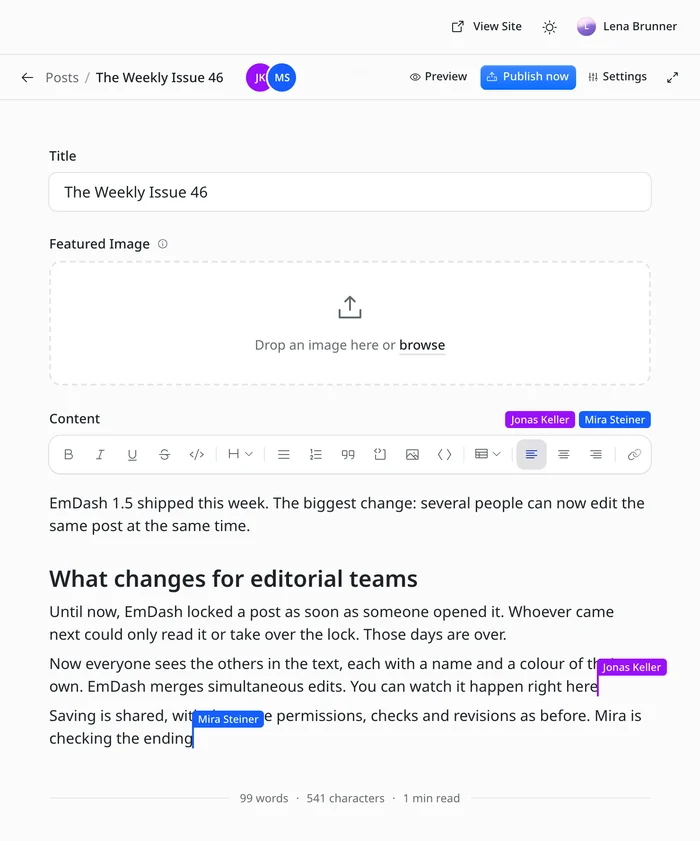
Real-Time Co-Editing in EmDash: Collaborating in the Same Entry
Until now, EmDash placed an exclusive edit lock whenever someone opened an entry. Anyone arriving second could either view it read-only or force-take the lock—kicking the other person out of the editor. For editorial teams where two people polish a draft together, that is too blunt an instrument.
With #4695, multiple people can work inside the same entry at the same time. Everyone sees the avatars of active collaborators at the top, an indicator showing which form field someone has focused, and live colored cursors with names inside rich-text fields. Concurrent text edits merge automatically, and Undo only reverts your own changes. Saving is shared and enforces the exact same permissions, validations, hooks, and revisions as before. External updates—whether through the REST API, MCP, CLI, the visual editor, or plugins—appear immediately in open editor sessions without a page reload.
Co-editing is turned off by default for now. You enable it explicitly in astro.config.mjs:
emdash({
	coEditing: true,
});Under the hood, the architecture adapts to your hosting runtime. On Cloudflare, each actively edited entry runs as an isolated session room inside a SQLite-backed Durable Object, synchronizing connected browsers over WebSockets. Fresh projects created from the official starter templates already include the required setup. How much faster EmDash gets when the whole site runs inside a Durable Object is something I measured in EmDash in a Durable Object. Existing sites need a binding and an export in wrangler.jsonc:
"durable_objects": { "bindings": [{ "name": "EMDASH_ROOMS", "class_name": "EmDashRoom" }] },
"exports": { "EmDashRoom": { "type": "durable-object", "storage": "sqlite" } },You also re-export EmDashRoom and EmDashRoomSite from @emdash-cms/cloudflare/worker in your custom Worker entry point. If the binding is missing, EmDash safely falls back to traditional edit locks. On Node.js, co-editing runs in-process (#4668)—meaning it does not support multi-worker node:cluster setups, and any reverse proxy in front of Node must pass WebSocket upgrades through. Full setup instructions are available in the deployment guides for Cloudflare and Node.js.
One sentence in the changeset reassured me more than anything else: public frontend pages make zero extra database queries whether co-editing is enabled or not. Collaborative rooms only spin up and consume resources when someone actually opens an entry in the admin.
There are a few practical boundaries worth knowing:
- Outside of rich-text fields, when two people change the same plain input at once, one of the two edits wins; only bylines, references, and taxonomy terms merge simultaneous additions and removals.
- Converting, moving, or deleting a block while someone else is actively typing inside it discards their unsaved text in that block.
- Anything that cannot be merged cleanly is preserved as a recovery revision in the version history rather than lost.
- If you run custom before-save hooks that inspect user roles, update them to check every user listed in
editedBy—not just the single person who clicked Save.
I tested co-editing on a test copy with three user accounts. The others' named cursors appeared inside paragraphs, sentences streamed in live as they typed, and saving updated the state for both accounts within seconds.
A Redesigned Block Editor That Keeps Long Pages Manageable
On long landing pages, the old editor made it far too easy to lose track of where you were: every block rendered its full form open at all times, even when you were working ten sections further down. Noah Pham redesigned the block editor from the ground up so you see the structure of your page first instead of a wall of inputs.
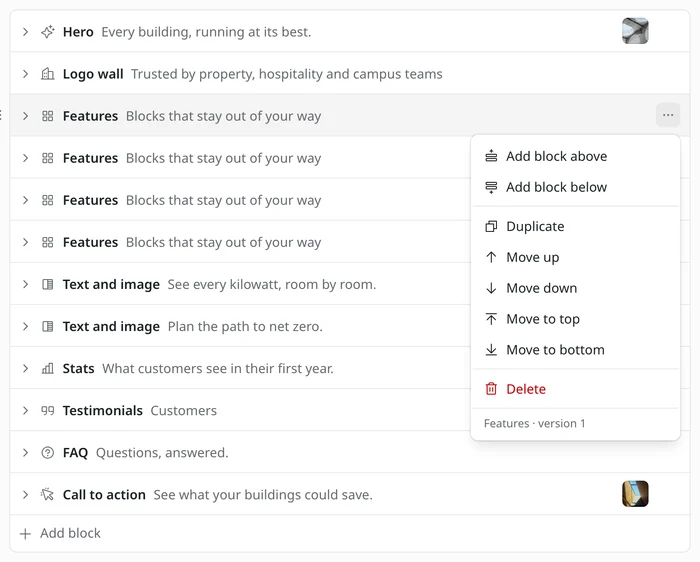
Blocks now start collapsed. Each row displays its icon, block type name, a short text preview, and a thumbnail image—letting you scan the entire page layout without opening a single field. Move, duplicate, and delete actions live neatly inside a ⋯ menu. Accidentally deleted a block? Hit Undo to bring it right back. Reordering works via mouse drag-and-drop or from the keyboard using Alt+Shift+Arrow.
When you expand a block, content fields sit cleanly at the top with layout and styling settings separated below. Array lists inside a block can be edited as simple lists, tables, or collapsible accordions. Client-side field validation also runs right inside the admin before saving, sharing the exact same rules as the server and highlighting errors directly next to the offending input.
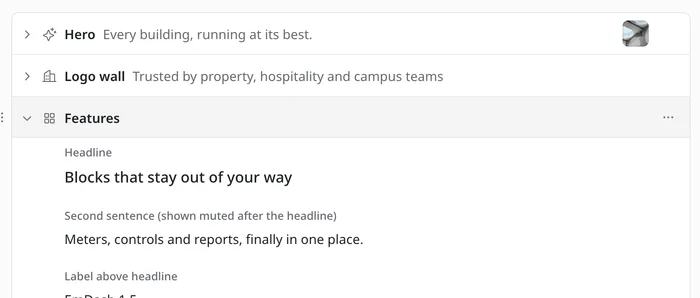
Existing content requires zero migration: stored data, API payloads, and frontend rendering remain completely untouched. If you copied custom block definitions from older marketing or portfolio templates, they will simply display a generic fallback icon until you add an icon property. How field names map to collapsed block previews is documented in the Blocks guide.
Reliable Version History: Autosave No Longer Overwrites Saved Revisions
I wish I had caught this bug earlier: previously, an autosave replaced the most recent revision—even if you had created that revision intentionally by clicking Save. If you saved a milestone, typed a few more sentences, and stepped away for coffee, your manually saved version vanished from Revisions.
Starting with #4637, an autosave only ever replaces a previous autosave. Versions saved explicitly by a user or generated automatically by system events stay untouched. Every revision now also records everyone who contributed since the prior version—for example, "Ana, Ben, and 1 other." While built primarily to support co-editing, this is just as useful for solo workflows: right before hitting publish, you can see everyone who touched the draft since the last live version.
Database migration 096_revision_kind_and_editors adds two columns to support this; older revisions continue to show their original single author. One operational caveat to keep in mind: once this migration has run, older EmDash versions can no longer export from or import into this site via Site Transfer.
Per-User Custom Sidebars Across the Admin
Under Settings → Sidebars, every user can now hide and reorder items in both the main admin navigation and the editor sidebar (#4628). Preferences apply to all user roles and are saved to your user account—meaning your layout follows you across browsers without affecting anyone else on the team. Only the Dashboard remains pinned at the top, and while the Publish box can be moved, it cannot be hidden.
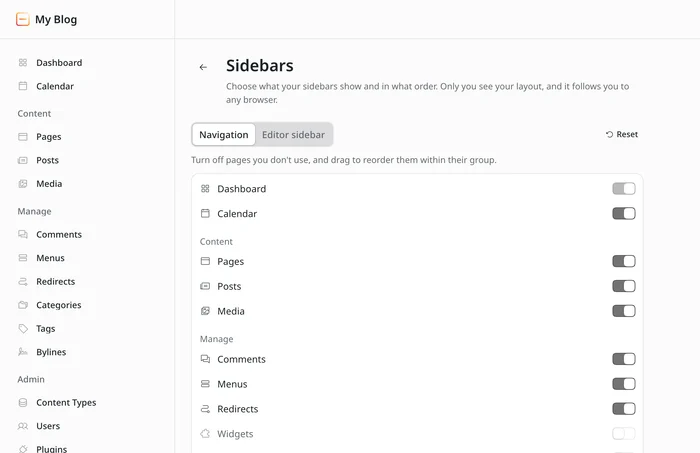
For editorial teams, this removes a lot of daily visual noise: writers who only work on articles can simply toggle off Redirects, Menus, and Plugins for themselves. If you want to hide items globally for the entire project, admin.hiddenNavItems from EmDash 1.4 continues to work as before. Because ordering now lives in Settings, the inline drag handles inside the editor sidebar have been removed; anyone who previously customized their panel order there will reset once to the default layout.
Alongside this, users without a profile picture now get a consistent colored avatar showing their initials everywhere in the admin (#4791)—making it easy to spot who is active inside a shared entry at a glance.
A Mobile Admin Interface You Can Actually Use on a Phone
Prior to EmDash 1.5, admin tables for content, comments, media, users, and taxonomies overflowed horizontally on phone screens. Worse, the … action menu sat at the far right edge, completely off-screen. Approving a single comment on mobile meant swiping sideways on every row.
Noah Pham reworked each table individually (#4494, #4520, #4527, and others). Below 42rem (672 pixels), secondary columns collapse away and metadata like status, language, and date stack neatly beneath the title. Because the tables use CSS container queries rather than viewport media queries, they respond to their own available width—so a tablet with the navigation sidebar open also gets the clean compact layout automatically.
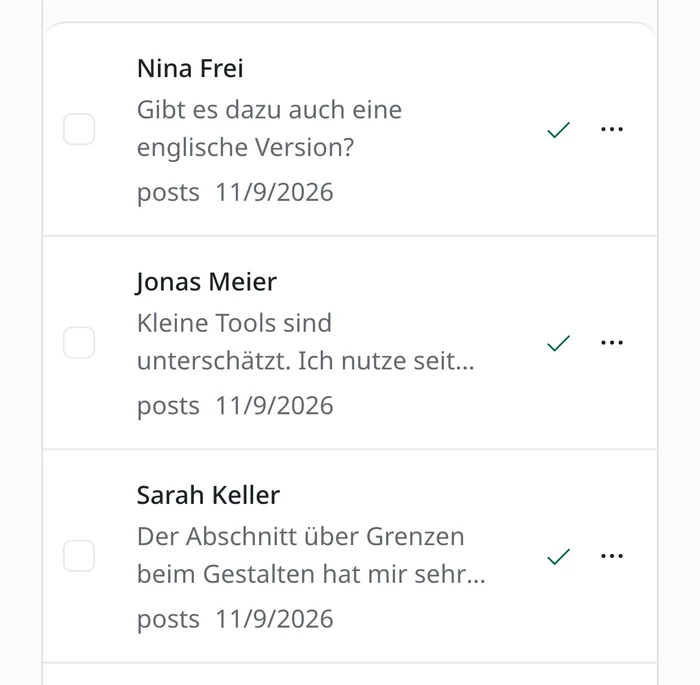
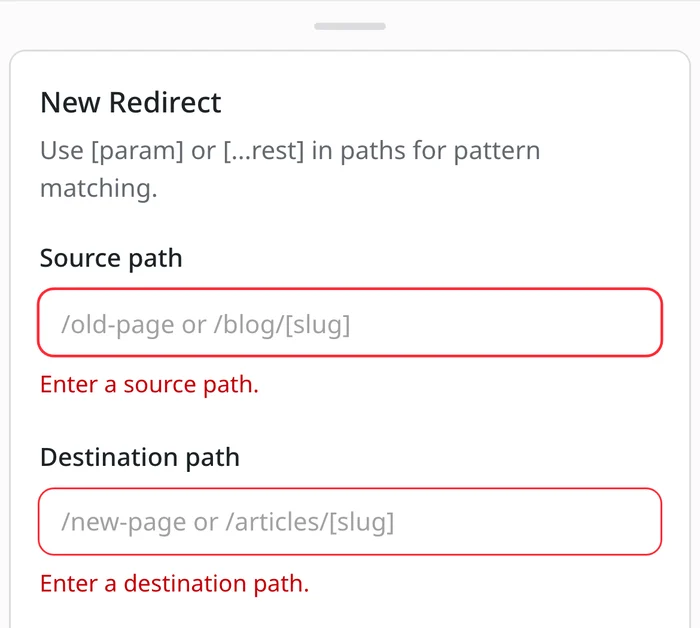
On mobile screens, dialogs now slide up smoothly as bottom sheets. The usability fixes that came with them improve desktop workflows just as much:
- Previously, Save buttons often stayed silently disabled whenever a required field was empty, leaving you guessing what was missing. Now the button stays clickable and points directly to the invalid fields with inline messages.
- Unsaved text inside a dialog is no longer lost if you accidentally tap the backdrop or swipe down on mobile.
- Destructive confirmations like Delete or Discard wait for the server to confirm success before closing—if a request fails, the error message stays visible right inside the open dialog.
The entry editor itself fits properly on small screens now too (#4485): the formatting toolbar wraps into a clean four-column grid instead of a horizontally scrolling strip, and save errors surface directly below the header.
Native AVIF and WebP Output Without Boilerplate
To serve modern AVIF and WebP images until now, I had to bypass EmDash's image component, reach for Astro's <Picture>, and manually reshape media library metadata to fit what Astro expected.
EmDash 1.5 eliminates that detour. I added a formats prop directly to EmDash's <Image> component (#3307), letting you declare target image formats right on the tag:
<Image
	image={post.data.featured_image}
	width={1200}
	height={675}
	formats={["avif", "webp"]}
/>EmDash renders a standard HTML `<picture>` element: browsers that support AVIF download the smaller AVIF source, and everything else falls back to WebP.
Omitting formats preserves the exact previous <img /> behavior. For assets served through external media CDNs, format negotiation remains handled by the external provider. Full usage details are in the Media Library guide.
Faster Image Uploads: Blurhash Placeholders Without Burning Worker CPU
Whenever you upload an image, EmDash calculates a Blurhash placeholder and a dominant background color. Until now, the server decoded the entire full-resolution original to compute those values. Unpacking a 24-megapixel photo inside a serverless Cloudflare Worker just to extract a tiny blur and a single hex color is an expensive way to spend CPU milliseconds.
Starting in 1.5, the admin browser generates a tiny thumbnail (capped at 64 pixels) during upload and sends it alongside the file, so the server only ever processes that miniature (#4213). As a bonus, uploaded WebP and AVIF originals now get placeholders too, while transparent PNGs no longer receive solid background fills that bleed awkwardly behind transparent pixels. If you want zero placeholder computation altogether, set imagePlaceholders: false in your config.
Cloudflare D1 Backups: Staying Reliable Under the New 50 MB Query Limit
On October 30, Cloudflare announced that starting November 4, D1 would reject any single SQL query whose response payload exceeds 50 MB. That is a sensible platform guardrail—except EmDash previously exported admin database backups and preview snapshots by reading each database table in a single unpaginated query.
On content-heavy sites or projects with deep revision histories, any table crossing 50 MB caused backup downloads to fail outright.
I spotted the changelog announcement early and wrote the fix (#4610), which merged on November 4—the exact day the limit took effect. EmDash now reads tables in paginated chunks during exports, keeping individual D1 queries comfortably below the cap while the backup contains the same data as before. No configuration is needed.
Even so, manual downloads from the admin should only ever be one layer of your recovery strategy. I wrote down what else I rely on in Backups in EmDash.
Built-In Agency Essentials: Staging Mode, Native SMTP, and Config Validation
Every agency launching client sites ends up solving the same three setup chores: keeping unfinished sites out of Google, wiring up transactional email, and catching silent typos in config files. EmDash 1.5 handles all three out of the box. When the switch pays off for agencies otherwise is covered in EmDash instead of WordPress?.
Staging Mode: Keeping New Sites Out of Search Engines Until Launch

Previously, every freshly installed EmDash site was immediately indexable by search engines from minute one. If nobody remembered to lock down SEO settings right away, half-built client pages and sample posts could easily end up indexed on Google.
With #3716, every new site created through the setup wizard or setup API starts in Staging mode by default. Unlike a separate staging server environment, EmDash's staging mode specifically governs search engine indexing:
- Every page whose template renders
<EmDashHead>automatically outputs<meta name="robots" content="noindex, nofollow">in the HTML<head>, overriding per-page SEO settings or plugin overrides. (Custom templates that omit<EmDashHead>will not receive the tag automatically.) - Crucially,
/robots.txtcontinues to serve its normal rules (withCache-Control: no-storeso CDN caches don't hold onto it). That distinction matters: ifrobots.txtblocked crawlers from fetching pages altogether, Googlebot would never actually read thenoindexmeta tag. - A persistent yellow Staging badge in the admin header makes it obvious that search engines are still held back.
Once the site is ready for the public, an administrator clicks Go live under Settings → General (or toggles it via the Settings API or MCP). If needed, you can switch a live site back to Staging mode from the same screen later.
One important clarification: Staging mode is not password protection or access control. Anyone who knows the direct URL—such as a client reviewing pages before launch—can browse the site normally. Existing live sites upgrading to 1.5 are completely unaffected, and neither Site Transfers nor emdash export-seed overwrite a target site's live status.
Native SMTP Email Without a Plugin
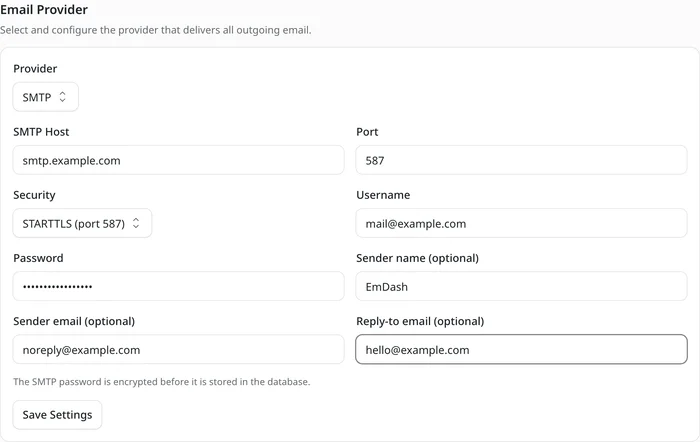
Sending transactional emails in EmDash previously required installing an email provider plugin. Now any standard SMTP server works out of the box—whether Brevo, Microsoft 365 / Office 365, Amazon SES, or a self-hosted Postfix instance, including on Cloudflare Workers (#2156). You can configure credentials under Settings → Email or via environment variables. SMTP passwords are stored encrypted in the database (requiring EMDASH_ENCRYPTION_KEY). Better yet, when a test email fails, the admin now prints the actual upstream SMTP server response instead of a generic failure toast. Setup details are covered in the Email guide.
Strict Configuration Validation in astro.config.mjs
Mistyped values in astro.config.mjs used to fail silently: passing mcp: "yes" instead of a boolean or maxUploadSize: "10MB" instead of a number produced zero warnings while quietly doing nothing. Starting in 1.5, astro dev and astro build validate options upfront, aborting immediately and naming the invalid keys (#4641). Misspelled option names like sitUrl trigger a targeted warning suggesting the right key. As a result, a previously green build might fail once right after upgrading if latent config typos were hiding in your setup.
New Developer Options for Collections, Seeds, and Plugins
- System timestamp sorting: Content lists in the admin can now sort directly by publication date, creation date, or last modification time. Collections can reference
publishedAt,createdAt, orupdatedAtnatively without maintaining a redundant custom date field (#4730). - Disable scheduled publishing: Collections that never need scheduled posts can turn the UI off via
no-scheduling(#4729). - Local seed media files: Seed images no longer need to be hosted at a public URL;
$media.fileloads assets straight from local project paths (#4728). - Conditional plugin panels: Plugins can define
isVisibleto control dynamically when their sidebar panels appear inside the editor (#4731).
Key Bug Fixes: WordPress Migration, Redirects, and D1 Query Performance
Alongside headline features, EmDash 1.5 ships dozens of fixes across WordPress imports, non-ASCII URLs, database round-trips, and frontend rendering.
Moving From WordPress
- Password-protected posts were imported as public (#4742, Daniel): Previously, importing a WordPress WXR XML file turned password-protected posts into published public entries readable by anyone. EmDash 1.5 imports them safely as drafts and lists every affected post in the import summary. If you imported a WXR file prior to 1.5, filter your old WordPress posts, pages, and custom post types by "Password protected" and unpublish those entries in EmDash manually. The same applies to migrations run through the EmDash Exporter WordPress plugin—it does not export post passwords, and 1.5 does not change that.
- Navigation menus were skipped during WXR imports (#4666): XML imports now bring menus over properly.
- Duplicate guest bylines every 30 posts (#4601): Large imports run in batches, and previously each batch recreated the same guest author all over again.
- Columns and Cover blocks lost everything except plain text during import (#4603). Nested inner blocks now survive intact.
- The `emdash import wordpress` CLI command actually exists now (#3765): The WordPress migration docs already referenced this command before the CLI implemented it. It converts a WXR export into local JSON files, downloads media attachments, generates a redirect map, and supports resuming interrupted runs via
--resume. Writing to the database still happens through the admin importer. As a side fix,emdash --versionno longer printsv0.0.0. - Classic Editor posts previously collapsed into a single giant paragraph (#4602). Blank lines now split paragraphs properly.
- Menu links pointing to Custom Post Types such as
team-memberdisappeared when migrating via the EmDash Exporter plugin (#4592, Daniel). Already-imported menus cannot be repaired retroactively, so affected links need to be re-added once. - WordPress button blocks arrived as static, uneditable blocks (#4595). They now expose proper inputs for label, link URL, and button style, and typing
/buttonsinserts new ones. - Original dates on WordPress drafts were lost during import (#4709): publishing an imported draft later stamped it with the current date and altered date-based permalinks. Draft timestamps from WordPress are now preserved.
- Markdown imports via API, CLI, and MCP preserve nested inline formatting, links, and list indentation (#4607). GitHub Flavored Markdown (GFM) tables convert into native table blocks and export cleanly back to Markdown. Note one behavioral change: single line breaks now become soft breaks within the same paragraph; separate paragraphs require a blank line.
Redirects and URL Slugs
- Redirects containing umlauts or diacritics (such as Czech háčeks) never matched (#4615): visiting
/stitek/domácí-zvířatareturned a 404 regardless of whether the rule was entered raw or percent-encoded. Both forms match reliably now—the kind of bug you never catch if you only test English ASCII slugs. - Draft slug edits creating pointless redirects (#4445, Daniel): renaming the slug of an unpublished draft previously created a redirect from a URL nobody in the outside world had ever seen.
- Long taxonomy term slugs on D1 (#4098): when a tag slug of 49 characters or more collided with an existing slug, D1 crashed with
LIKE or GLOB pattern too complexinstead of appending a numeric suffix. - Trailing-slash redirect mismatches (#4697): for collections whose URL pattern ends in
/(like/whats-on/{slug}/), automatic redirects after a slug change pointed to the non-slash URL. Generated redirects now keep the trailing slash, and existing rules match with or without it. - Scoped API token permissions for redirects (#4061): managing redirects via API tokens previously required full
adminscope. Nowcontent:readsuffices for reading andsettings:managefor writing, while viewing the 404 log (which includes visitor IP addresses) requiressettings:read.
Fewer Database Round-Trips on D1 and SQLite
On Cloudflare D1, every query is a network round-trip. What really slows EmDash down on Cloudflare is broken down in A cold cache, not a cold start. Several targeted optimizations cut unnecessary trips out of request paths:
- No session lookup without a cookie (#4726): public pages used to query session storage even for anonymous visitors with no cookie set. Now EmDash only checks sessions when a cookie is actually present.
- Batched Worker cold starts (#4172): fresh Worker isolates previously ran a standalone query to verify database migrations before loading settings and plugins. Both now execute in the same batch—saving one database round-trip on nearly every cold start.
- Consolidated object cache checks (#4079): a page rendering posts, menus, authors, and taxonomies typically reads a single validation key instead of one per domain.
- Entries with empty taxonomies (#4088): rendering a post list containing untagged articles no longer fires empty follow-up term queries.
- Smarter scheduled-publishing cron (#4560): the cron runner now queries only collections with due items instead of scanning every collection twice.
- Deduplicated custom byline queries (#4631): custom byline fields load once per request rather than once per
getEmDashCollection()call or related-posts list. - Eliminated extra byline schema lookup (#4727): byline field schema versions now piggyback on content reads instead of running a separate query.
- Lighter module imports on public routes (#4596): importing anything from
emdashused to eagerly load API schemas, the WordPress importer, and seed utilities before rendering the first public page. Those modules are now lazy-loaded only when the admin, API, or importer actually needs them. - Smarter multi-taxonomy filtering (#3266): filtering across multiple taxonomies starts from the smallest term set instead of blindly picking whichever filter appeared first in
where. - Primary-key lookups on `where: { id: [...] }` (#3916): SQLite previously fell back to full collection scans after
ANALYZEwhenever trashed items existed; queries now hit the primary key index reliably. - Stale reads in `objectCache` (#4651): under heavy concurrent reads with
objectCacheenabled, an outdated version of an updated entry could remain cached until the next write or TTL expiration.
Admin and Editor Polish
- Clearer button label on new entries: Saving a brand-new entry now says Save draft, accompanied by sidebar copy clarifying that nothing appears publicly until published (#4640).
- Initial state preserved in revisions (#4389, Daniel): previously, the earliest recorded revision was already the first edit, making it impossible to diff against or restore the original baseline—including on translations, duplicates, and imports.
- No premature required-field errors (#4385): empty required image, file, and reference fields used to complain with "This field is required" the instant you opened a blank form. Validation now waits until Save and announces properly to screen readers.
- Graceful handling of malformed dates (#4570): broken date strings from legacy imports used to crash admin views. They now render as empty fields.
- Multi-entry publishing in the visual editor (#4484): editing multiple entries on one page in the visual editor now publishes all of them rather than just the first; if one fails validation, the rest stay published.
- Proper access-denied state for non-admins (#4717, Daniel): non-admin users navigating directly to Settings, Users, or WordPress Import URLs now see a clean "Access denied" message instead of broken half-loaded screens.
- Instant role updates (#4174, Daniel): changing a user's role takes effect immediately instead of lagging behind a five-minute cache window.
- Conflict detection after background refreshes (#4776): if the editor refreshed in the background and you subsequently reverted unsaved local edits, your next save could silently overwrite a colleague's changes. EmDash now flags the conflict explicitly.
- Surfaced errors for failed scheduled posts (#4782): when a scheduled post failed validation or hit a duplicate slug, the cron job previously retried forever while hiding errors in server logs. Failed schedules are now paused and surfaced directly on the admin Dashboard with their error reason.
- No double reload on cold `astro dev` start (#4593): opening the admin right after starting
astro devno longer triggers a full reload that could leave plugin pages running stale modules. - Up-to-date titles in content lists (#4734): collections with revisions enabled now immediately reflect updated titles on unpublished drafts in overview tables.
- Sensible default view for Form Submissions (#4521): opening submissions selects the form with the latest entries rather than an empty new form.
- Predictable repeater fields: Repeaters now handle empty rows (#4479, Daniel) and
Selectinputs (#4625) cleanly.
Daniel also completed the German admin localization—covering forms and redirects (#4545), stray English "not found" states (#4421), and every remaining untranslated string across the interface (#4718). If you run the admin in English you will never notice, but for German-speaking editorial teams, it makes a difference every single day.
Public Website Fixes
- Immediate cache invalidation on comment moderation (#4460): approving, moderating, or deleting comments now purges the cached page immediately rather than waiting for cache expiry.
- Localized widgets on translated pages (#4604): category, tag, recent-posts, and archive widgets respect the active locale instead of falling back to the default language, and localized post URLs follow
/en/posts/…instead of/posts/en/…. - Clean fallback links for unsupported iframe embeds (#4696): third-party iframes outside YouTube or Vimeo (like Google My Maps embeds migrated from WordPress) now render a link to the source URL instead of an empty box.
- Merged `Organization` entities in JSON-LD (#3019):
BlogPosting,publisher, andWebSitepreviously lacked@idreferences, causing customOrganizationgraphs to appear as duplicate organizations alongside the publisher. If you emit your own organization schema, ensure its@idis<origin>/#organization(with a trailing slash before#) so both nodes merge cleanly. - Removed render-blocking plugin admin CSS from public pages (#4482): stylesheets imported inside a plugin's
adminEntrywere previously bundled onto every public frontend route as render-blocking CSS—an invisible drag on Core Web Vitals. - Deduplicated `srcset` URLs (#4478): when Astro's image service returned the original asset URL unchanged, the same URL appeared several times in
srcset, including inside<picture>. That is fixed. - Accessible dark-mode comments (#4575):
CommentsandCommentFormno longer suffer from harsh light borders or low-contrast submit buttons under.dark, with CSS variables exposed for customization. - Full support for Astro's `base` path (#4591): running EmDash under a subpath now prefixes URLs properly in archive widgets, recent posts, and
hreflangtags. - Custom R2 media domains for logos and favicons (#4284): sites serving media from a custom R2 domain now use that CDN URL for site logos, favicons, and social preview images too instead of internal asset paths.
- Resolved Portable Text TypeScript types (#4662): types imported from
emdash/uiresolve cleanly, and<PortableText>strictly type-checks its props—so invalid props will surface when runningastro check.
Authentication and Plugins
- Database hiccups return `503` instead of `401` (#4619): if a database query fails transiently during external auth, EmDash responds with
503 Service Unavailablerather than masquerading an outage as invalid credentials. - Cloudflare Access one-time PIN logins (#4555): group-less PIN logins no longer fail when
roleMappingis configured, falling back todefaultRoleas expected. - Multiple EmDash instances on a single host (#4665): sandboxed plugins no longer clash over a hardcoded port range when two EmDash sites share one server; ports are now assigned dynamically by the OS.
- Higher subrequest ceiling for sandboxed plugins (#4712): isolated plugins can make up to 30 calls per invocation (up from 10) across settings, storage, and network—matching Cloudflare's platform limit.
- Scoped `uniqueIndexes` in plugin storage (#4715): unique constraints previously applied globally across all plugins and collections, letting one plugin accidentally block inserts in another. Migration
095_plugin_storage_unique_scopescopes existing indexes properly to their own collection. - Honest MCP errors for static `robots.txt` files (#4694): if a project defines a static
src/pages/robots.txt, MCP rejects updates toseo.robotsTxtandseo.disallowAiTraininginstead of claiming success for settings that can never take effect. - Plugin registry & display names: Published registry plugins remain installable even while a newer profile revision awaits review (#4557), and config-registered plugins display their human-readable name instead of their raw ID (#2817).
Upgrading to EmDash 1.5: What Sites With Sandboxed Plugins Need to Watch Out For
For most websites, upgrading to EmDash 1.5 follows the exact routine you are used to. There is one critical exception: if you run isolated sandboxed plugins (`sandboxed: []`), you must stop all database writes beforehand and run the database migration explicitly before restarting your app.
The reason is migration 092_plugin_kv_options (#4277). EmDash distinguishes between regular in-process plugins (plugins: []) and isolated sandboxed plugins (sandboxed: []). Previously, the two execution modes stored their key-value data (ctx.kv) in separate places—meaning moving a plugin into or out of sandboxed: [] wiped its saved KV state. Migration 092 unifies both KV stores, which is the right long-term fix, but copying records across stores requires quiet database access. (For a deeper look at how plugin isolation works, see The Plugin Sandbox Problem.)
Why you shouldn't rely on automatic startup migrations when using sandboxed plugins: auto-migration boots your plugins immediately afterward, leaving zero time to inspect logs for key conflicts before plugins start writing fresh data. Nor does EmDash stop you from upgrading emdash while leaving an external sandbox runner on an older version—you have to coordinate both yourself.
I tested this exact migration on a clone of my demo site running a sandboxed plugin and deliberately planted a conflict beforehand: identical keys holding different values in both stores. On startup, EmDash logged Conflicting KV values; keeping the in-process value along with the plugin ID and key name. The in-process value won, non-conflicting keys copied over cleanly, and the original sandbox rows remained untouched inside _plugin_storage. Nothing is deleted—but in a conflict, your sandboxed plugin may suddenly read a different value than it did five minutes earlier. That is why you want to read the migration output before resuming writes.
Sites without sandboxed plugins can ignore this completely. The migration only copies sandbox KV rows; where none exist, it is a no-op. In the production database for The Weekly Dash, which runs zero sandboxed plugins, there wasn't a single row to migrate.
The remaining five migrations in 1.5 are completely benign and run automatically:
093_menu_item_orphanspromotes orphaned child menu items (whose parent item was deleted) to the top level—matching how the public site already rendered them while making them visible again in the admin.094_media_usage_file_url_reindexteaches media usage tracking to detect images referenced solely by raw file URL inside content.095_plugin_storage_unique_scopescopes unique plugin storage indexes to their respective collection.096_revision_kind_and_editorsadds revision type and multi-editor columns to revisions.097_room_storagecreates the backing tables for real-time co-editing (both096and097run even ifcoEditingstays turned off).
I appreciate how bluntly the changeset calls out the KV migration. A changelog that buries a stateful storage migration in fine print is worse than having no changelog at all.
How I Upgrade Step by Step to EmDash 1.5
I covered my general upgrade workflow in Updating EmDash. For 1.5, here is my exact checklist:
- Back up your database. Starting in 1.5, D1 backups succeed reliably again even on databases with tables exceeding 50 MB.
- Pause everything that writes to the database (only if you run sandboxed plugins): stop app instances, scheduled crons, and background plugin jobs.
- Bump `emdash` and `@emdash-cms/cloudflare` in lockstep to `1.5.0`. The Cloudflare adapter now enforces an exact version match (#4582)—
npmaborts withERESOLVEon mismatches whilepnpmprints a peer warning. That strictness is intentional: previously, version drift caused package managers to silently bundle a duplicate copy ofemdash. If you install@cloudflare/kumodirectly, pin it to exactly2.15.0(#4308), and update official packages like Forms, Field Kit, AI Moderation, and AI Search alongside core. - Run a local build before deploying. If
astro buildhalts on an invalid option type inastro.config.mjs, fix the flagged keys first. Runastro checkafterward to catch any invalid props passed to<PortableText>. - Run `pnpm emdash migrate` against your target database (note that the CLI does not load
.env,.env.local, or.dev.varsautomatically—export credentials in your shell) and inspect any KV conflict warnings before re-enabling plugin writes. Rollback steps are documented in the plugin upgrade guide. - Deploy. If you want real-time co-editing, roll out
coEditing: trueand the CloudflareEMDASH_ROOMSDurable Object binding in a separate second deploy once the base upgrade is live. - Open the admin on your phone once. Not to QA it—just because, for the first time, it actually feels good to use.
On my test clone, the upgrade went through without surprises: after bumping to 1.5.0, the build passed config validation cleanly, migrations 092 through 097 executed on startup, and my planted KV conflict logged exactly as documented. The only minor snag came from my own package manager config: I set minimumReleaseAge in pnpm to hold back packages published less than 24 hours ago, which caught a few fresh Astro dependencies the day after release. If you use the same setting, either wait a day or add an allowlist exception for EmDash and Astro. Also worth noting locally: emdash migrate against local D1 requires an authenticated Cloudflare account, whereas running astro dev applies local migrations automatically without one.
Quick FAQ: Common Questions About EmDash 1.5
Does EmDash 1.5 modify my existing content?
No. Stored entries, API responses, and frontend rendering stay exactly as they are. Database migrations only touch plugin storage, orphaned menu items, media usage indexes, revision metadata, and new co-editing tables. The sole content caveat applies to sites that previously imported password-protected posts from WordPress—those should be manually reverted to drafts.
Do I have to turn on real-time co-editing?
No. Without coEditing: true in astro.config.mjs, EmDash keeps its existing single-editor locking behavior. Enabling co-editing on Cloudflare also requires adding the EmDashRoom Durable Object binding in wrangler.jsonc and your Worker exports.
Do I still need a plugin to send email in EmDash?
No. Any standard SMTP server works natively now under Settings → Email. Dedicated email plugins can be retired.
Will Staging mode de-index my existing live website from Google?
No. Automatic staging mode only applies to brand-new sites initialized through setup after upgrading. Existing live sites stay live and indexable.
Do I need to configure anything for Cloudflare D1 backups over 50 MB?
No. Upgrading to EmDash 1.5 is enough—paginated backup queries are active out of the box with no flags to toggle.
Who needs to be extra careful during the EmDash 1.5 upgrade?
Sites running isolated sandboxed plugins (because of the ctx.kv storage migration) and sites that migrated from WordPress on earlier versions (to verify password-protected posts). For everyone else, 1.5 is a standard upgrade: bump packages, build, deploy.
Final Takeaways on EmDash 1.5
For me, three additions define this release: real-time collaborative editing, a block editor that finally tames long pages, and native SMTP email without extra plugins. Keeping co-editing opt-in for now is the right call—it is the biggest architectural change to the editor since EmDash launched, and teams that need it can enable it deliberately. Just as valuable are the quieter fixes you feel every day: manual saves that survive autosave, mobile table menus you can actually reach with your thumb, working redirects on non-ASCII URLs, and D1 backups that don't choke at 50 MB. If you run sandboxed plugins, plan a brief maintenance window for the migration; if you migrated from WordPress earlier, double-check your password-protected posts.
And if you spot a rough edge on mobile, with a non-ASCII slug, or up against a Cloudflare D1 limit: open an issue on GitHub.

Kevin Kyburz
Blogger, entrepreneur and lecturer from Basel. I write about technology, WordPress, and the work behind my projects.
More about me