


EmDash 1.5 was a big celebration for editorial teams: real-time co-editing, a fresh block editor, and email via SMTP. EmDash 1.6 heads downstairs to tidy up the engine room. Poke around the admin after updating and you will mostly spot handy quality-of-life touches like breadcrumbs and extra room to write. Look at your response times and your Cloudflare bill, however, and you are in for a much bigger treat.
97 commits from 18 people and two bots went into this release, roughly a third the size of 1.5. Almost all of them eliminate wasted work that goes unnoticed in quiet local testing, yet quickly adds up under real traffic: images routed through your Worker on every single view, error pages freshly rendered for every passing scanner bot, and scheduled articles taking an extra minute to show up.
What's new | What it brings to daily use | PR |
|---|---|---|
Media cache | Original images and resized variants stay cached for a full year | |
Cached 404s | Typos and bot scans on missing posts are served from cache for up to 60 seconds | |
No more delay | Scheduled posts go live at the exact minute set instead of up to a minute late | |
Breadcrumbs | Admin subpages always show the way back, such as Settings › General | |
Full-width editor | One click hides the right sidebar and gives your writing the full stage | |
Smart Enter key | Reversible dialogs confirm on | |
Draft access for plugins | Plugins can write suggestions straight into open fields without overwriting live typing | |
Smarter search | Post titles finally outrank random body mentions while reading fewer rows on D1 |
I am especially happy that three of these performance wins are mine: the new media cache, clean cache invalidation for missing posts, and one fewer database write on every cold start. All three came straight out of profiling where EmDash was breaking an unnecessary sweat on my own sites.
Images stay cached for a full year
Until now, EmDash was surprisingly inconsistent about caching: rendered HTML pages went straight into the cache, while images never did. Every request for an original file under /_emdash/api/media/file/ and every resized variant via /_image went all the way through to the Cloudflare Worker. On an article with ten photos, that meant one fast cache hit for the text and ten unnecessary wake-up calls for images that had not changed in months. Eleven Worker invocations instead of one.
#4911 puts an end to that. Whenever a compatible route cache like cacheCloudflare() is active, EmDash caches both originals and resized variants for a full year. You do not have to worry about stale pictures either: every variant shares the same cache tag (emdash:media:<storageKey>). Replace or delete an image in the admin, the media picker, via MCP, or inside a plugin, and EmDash purges every cached version right away.
Technical details and edge cases for the media cache
To keep the cache from storing separate entries for every creative way of spelling the same URL, EmDash now normalizes requests to /_image. Unknown, duplicate, or out-of-order parameters trigger a 301 redirect to the clean canonical URL (even without caching enabled). URLs generated by Astro's <Image> and getImage() are already clean; you will only spot an extra redirect in the network tab if you assemble image URLs by hand.
Intentionally not cached:
- Audio and video files, as well as partial responses (
Rangerequests) - Original media files requested with a query string
- Media when using Astro's
memoryCache(), keeping images from filling up RAM - Custom image services outside Astro's defaults (
sharpon Node.js and@astrojs/cloudflare/image-service-workerdon Cloudflare)
Where tag purging hits platform limits is documented in the route caching guide.
Missing posts are no longer rebuilt on every visit
When a human reader mistypes a URL and hits an error page once, nobody minds. On the real web, however, automated scanners knock on the door all day long, probing hundreds of made-up post URLs in a single minute. Previously, EmDash politely rendered the entire /404 page from scratch for every single miss, complete with layout and database queries. I broke down just how fast that adds up in Rejected before it costs.
Starting in 1.6, EmDash can serve those 404 responses for missing posts straight from the cache for up to 60 seconds (#4992). If an eager scanner hammers the same nonexistent slug twenty times in a minute, your Worker only renders it once. Even that first uncached render is lighter now: when a page rewrites to /404, EmDash reuses menus and site settings from the initial pass instead of querying the database twice (#4840).
What if you publish a brand-new post at that exact URL thirty seconds later? Thanks to #4994, your article will not stay stuck behind its old error page: getEmDashEntry() now returns the collection tag inside cacheHint on a miss, so publishing immediately purges the cached 404.
What to check in custom Astro templates and your WAF
For a cached 404 to clear immediately upon publishing, your detail template needs to pass the cacheHint from getEmDashEntry() before rewriting to /404:
const { entry, cacheHint } = await getEmDashEntry("posts", slug);
Astro.cache.set(cacheHint);
if (!entry) return Astro.rewrite("/404");The official templates do this out of the box in 1.6; custom templates are worth a quick check.
Good to keep in mind:
- You still want a firewall: Paths that do not match an Astro route, internal paths, and classic scanner targets with file extensions like
/.envor/wp-login.phpbypass this cache as before. Block those at the Cloudflare WAF. - Admin 404 log: Cached
404hits never reach the Worker, so the internal 404 log in the admin will not count repeat hits served from the edge. - Opting out: If you prefer never to cache misses at all, add
Astro.cache.set(false)to the frontmatter of your 404 page.
Scheduled posts no longer go live late
When you schedule a post for 8:00 AM and set your newsletter to go out at 8:00 AM sharp, the old behavior was a bit nerve-wracking: depending on when Cloudflare's next cron tick fired, the post actually went live anywhere between 8:00 and 8:01. Your fastest newsletter readers clicked straight into a 404.
Noah Pham fixed that waiting game in #4787. On Cloudflare, each cron run now looks ahead, waits up to 70 seconds for upcoming posts, and publishes each one at its exact timestamp. Because waiting while idle consumes zero CPU time, it costs nothing extra. On Node.js, the check now runs right at the top of every minute, making minute-scheduled posts punctual there too.
Notes for custom Worker entrypoints and Cloudflare logs
In your Cloudflare Workers logs, you will notice cron invocations staying open for up to a minute and occasionally overlapping when a scheduled post is due. That is expected and nothing to worry about.
Sites using createScheduledHandler() from @emdash-cms/cloudflare/worker get this automatically. If you maintain a custom Worker entrypoint and call runScheduledTasks() directly, pass the new option yourself:
await runScheduledTasks({ publishUpcomingWithinMs: 70 * 1000 });On Node.js, there is one minor caveat: schedules set to a full minute (as done in the admin UI) go live right on time, while second-level timestamps set via API or MCP may still wait until the start of the next minute.
The admin clears space and guards against misclicks
Anyone spending their day inside the admin gets a thoughtful set of ergonomic upgrades in 1.6, most of them also built by Noah Pham.
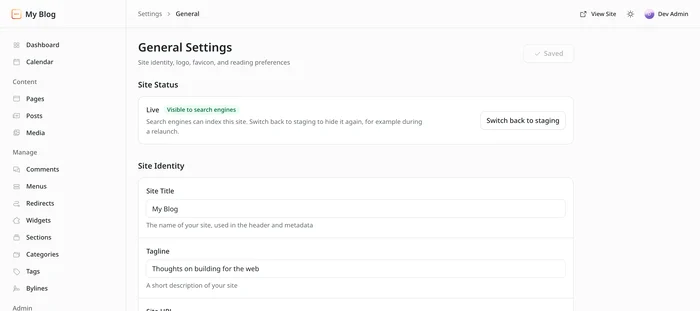
- Breadcrumbs instead of guesswork (#4939): Subpages now display their full path at the top, such as Settings › General, Menus › Main Navigation, or Media › Product Photos. Clicking the parent level replaces the old back buttons. Even better in the media library: leaving a folder drops you right back at your previous scroll position. On mobile screens, View site and the Staging badge collapse neatly to icons.
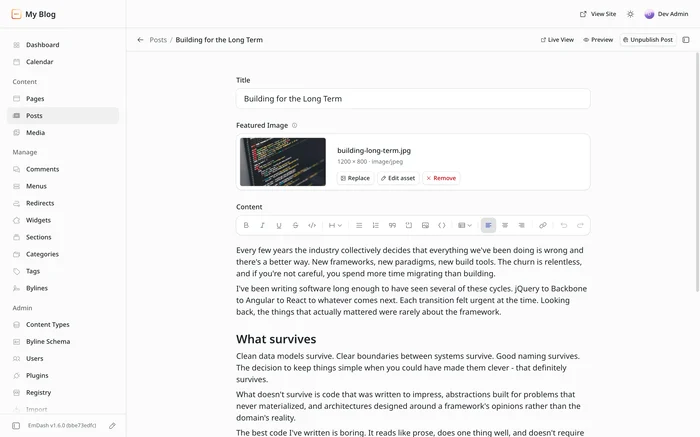
- Full width when writing (#4779): On screens 1024 pixels and wider, a new toggle at the end of the editor toolbar tucks away the sidebar holding Publish, Slug, and SEO fields. Your text centers cleanly across the full width, and the browser remembers your preference. If a required sidebar field is missing or you open image settings, the panel slides right back open on its own. This replaces the old distraction-free mode (and its
⌘⇧\shortcut). - An Enter key that knows the stakes (#4854): Confirmation dialogs now distinguish routine actions from destructive ones. Reversible steps like Publish now, Move to trash, or Restore this version focus the confirm button so you can breeze through with
Enter. Permanent actions like Delete permanently - or bulk actions that would wipe a scheduled publish time - place focus safely on Cancel. HittingEnterby reflex just closes the modal instead of ruining your morning.
Plenty of smaller polish landed alongside those: dashboards, content lists, calendars, and the trash update immediately after saving (#4832), Publish and Unpublish sport matching globe icons, and the user list finally records the actual last login time for Magic Link, OAuth, and Cloudflare Access instead of forever claiming "Never" (#4805).
Search puts matching titles first
On smaller sites, search results used to feel backwards: typing the exact title of an article often surfaced a completely different post first simply because it happened to mention the word three times in a paragraph.
#4194 sorts results in clear tiers, the way readers expect. Exact phrase matches in the title come first, followed by titles containing all search terms, and only then body matches. Among competing title hits, shorter and punchier titles win. At the same time, searching on Cloudflare D1 gets cheaper because cold Worker isolates no longer count every row in the search index just to check for partial builds (#4760, #5010).
Search score changes and index recovery for developers
- Normalized scores:
scorevalues are now normalized between0and1per collection instead of raw BM25 numbers. If your custom code filters by hardcoded thresholds likescore > 5, adjust those checks and keep the returned array order rather than re-sorting byscoreyourself.searchCollection()retains the legacy values. - Partially populated indexes: EmDash still rebuilds missing or completely empty indexes automatically. If an interrupted build ever leaves an index half-filled, trigger a manual rebuild with an admin token via
POST /_emdash/api/search/rebuildas shown in the REST API reference.
Plugins can collaborate on unsaved drafts
For anyone building plugins (or using AI helpers and translation panels inside the editor), #4626 unlocks a much smoother workflow. Until now, editor plugins could only see what was last saved to the database.
In 1.6, native plugin panels receive editorDraft right next to entry. Calling editorDraft.get() reads whatever is currently sitting in the form - unsaved field edits, slug, SEO title, and meta description included - along with a revision number. Calling editorDraft.patch() writes suggested values straight back into the live form without forcing a save.
The revision number is the safety net here: if an editor keeps typing while a translation or excerpt plugin is thinking, the editor politely rejects the stale patch instead of clobbering fresh keystrokes. Sandbox plugins using admin.editor-draft:patch also update rich-text fields cleanly now, without the next keypress reverting the document to its pre-patch state.
Fewer database round-trips on D1
On Cloudflare D1, every query is a network hop, and on a cold isolate those hops stack up fast. I mapped out where that latency goes in Cold cache instead of cold start. EmDash 1.6 trims several round-trips:
- No cold-start write query (#4999, by me): Previously, the very first visitor request on a fresh isolate cleared stale plugin cron locks in the database. Because that is a write query, D1 always had to route it all the way to the primary database - even when the visitor was halfway around the world with a fast read replica right next door. Only the maintenance cron handles that cleanup now.
- Deduplicated entry lookups (#4926): When your layout and page blocks call
getEmDashEntry()with identical arguments, EmDash queries D1 once and shares the returned object (clone it first if you mutate it in code). - Locale-aware menu preloading (#4857): On multilingual sites, EmDash preloads menus and taxonomies in the current page's locale. Tip for custom layouts: pass
{ locale: Astro.currentLocale }togetMenu()so it grabs the preloaded data instead of firing an extra fallback query. - Resilience under concurrent saves and aborted requests (#4960, #4970): Two editors saving at the exact same moment can no longer wedge a Worker isolate on a media-usage lock, and a visitor aborting a page load mid-flight will no longer trip up the next request via the Object Cache.
Ten everyday paper cuts disappear
Beyond the headline features, 1.6 clears out ten frustrating bugs. Exact redirects for files like /old/report.pdf finally fire, media search on D1 no longer crashes on long words with umlauts or accents, and Used in tracks down media files linked inside HTML blocks or plain URL fields.
All 10 additional bug fixes at a glance
- Unknown roles from your login provider no longer lock users out (#4935): If an external identity provider sent an unrecognized role level (anything outside
10,20,30,40, or50), EmDash saved it to the user record and broke every subsequent login for that account. Invalid logins are now rejected upfront without touching the account. Note: Already affected accounts still need their IdP role mapping fixed first, followed by updatingrolein theuserstable. - File redirects work (#4964): Exact redirect rules like
/old/report.pdfnow take effect (wildcard patterns still ignore paths with file extensions). - Fresh
lastmodin sitemaps after SEO edits (#4976): Updating only the SEO title or meta description now bumpslastmodin the sitemap as expected. - Markdown stays plain text on round-trips (#4238, Daniel): Paragraphs starting with
#or1.no longer turn into headings or lists when read and written back via CLI, MCP, orEmDashClient. - Plugin routes work right after install (#4866): Newly installed or updated registry plugins no longer intermittently return
404 Plugin route not foundon warm isolates. - Sturdy media search on D1 (#4947): Long search queries with non-ASCII characters no longer crash the media library, and searching by media ID or pasted file URL works too.
- Complete media usage tracking (#4968): Used in now detects files referenced via links, raw HTML blocks, or URL fields.
- Comment timestamps respect site timezone (#4910):
<Comments>uses the timezone configured under Settings › General rather than the server clock (falling back to UTC if unset). - Keyboard-accessible code blocks (#4967): Wide code blocks can be focused and scrolled horizontally via keyboard, with a clear focus ring and screen-reader label.
- SQLite WAL safety check (#4812): If
data.dbis missing while adata.db-walfile is still present, EmDash refuses to start instead of creating a blank database and risking data in the write-ahead log.
Updating to EmDash 1.6 needs zero downtime
Compared to the heavy lifting in 1.5, this update is refreshingly calm. There is just a single tiny migration (098_user_last_login for the user list), and it runs automatically on startup. No write freeze needed. For the general workflow, see Updating EmDash.
- Back up your database. Good habits make for quiet deployments.
- Bump the core packages to
1.6.0together: Updateemdash,@emdash-cms/cloudflare, and@emdash-cms/admin. If you install@cloudflare/kumodirectly, pin it to2.19.0(#4940) and update official plugins (Forms, Field Kit, AI Moderation, AI Search) at the same time so none of them pull in Kumo2.15.0. Give custom plugin UIs with bespokeDatePickerstyles orDialogheights a quick visual check afterward. - Check custom templates and scheduled handlers: Make sure detail pages pass
cacheHintfromgetEmDashEntry()toAstro.cache.set()before rewriting to/404, adjust any hardcoded searchscorethresholds, and addpublishUpcomingWithinMsif you invokerunScheduledTasks()manually. - Build and run
astro check: Types onAstro.locals.emdashgot stricter (#4935), so mutations likedelete item.draftRevisionIdwill now surface as TypeScript errors. - Deploy and test a fake post URL twice: Hit a made-up post slug two times in a row. If the second response carries
cf-cache-status: HIT, your new 404 shield is live.
Quick FAQ
Do I need to flip a switch for the media cache?
No, you only need an active route cache. If you already use cacheCloudflare() for your pages, upgrading gives you one-year image caching automatically. Without a route cache, nothing changes apart from cleaner /_image redirects.
Can a newly published post get stuck behind an old 404?
Only if a custom page template forgets to pass the collection's cacheHint - and even then, for at most 60 seconds. With cacheHint in place, publishing clears the cached 404 immediately.
Does EmDash 1.6 touch my existing content or media?
Not at all. The sole database migration adds the last-login timestamp column for users.
Where did distraction-free mode go?
It was retired in favor of the Hide settings toggle at the right end of the editor toolbar, giving your text full width without rearranging the rest of the interface.
My verdict on EmDash 1.6
EmDash 1.6 is not a flashy release built for launch-day slide decks; it is the kind of release that quietly makes running a site more pleasant every single day. Worker invocations drop for images, scanner bots bounce off cached 404s instead of hitting D1, and cold starts waste fewer round-trips across the network. On a small personal blog, that buys you crisp response times. On a busy production site, it saves real money every month.
Editorial teams still walk away with nice wins: scheduled posts that go live on the dot, a wider canvas for writing, breadcrumbs that keep you oriented, and an Enter key that knows when to be careful. Check the three template items in step 3 if you run custom code; everyone else can bump the version, deploy, and enjoy the quiet metrics.
Spot anything odd with cached images or error pages in production? Open an issue on GitHub.

Kevin Kyburz
Blogger, entrepreneur and lecturer from Basel. I write about technology, WordPress, and the work behind my projects.
More about me